

A shopper sees a sale price in their own currency, adds the product to the cart, and then finds a different number at checkout or a different currency on their card statement. Nothing about the product changed, but their trust did, and during a BFCM sale that moment is often where the order is lost.
In this guide to multi-currency checkout best practices, we will explain why currency shapes the price shoppers judge, then look at where currency shock happens in a BFCM sale, and show you how to keep prices steady from the first ad to the refund.
Currency is part of the price shoppers judge
Shoppers do not compare your price with your home market. They compare it with what they expect to pay in their own money, so the signals below can help you see how much currency decides whether a price feels clear and fair.
Shoppers respond to prices in their own currency
Show prices in the currency of each market you sell to on every page, from the product to the checkout. A price that a shopper can read without converting in their head removes one reason to hesitate at the busiest moment of the year.
In DHL’s survey of 29,000 shoppers in 29 countries, 41% said prices in their local currency would encourage them to buy from a retailer in another country (DHL, 2026). Payments provider Stripe reports that 76% of customers choose to pay in their local currency when given the option (Stripe, 2026).
A local price pays off well beyond the product page. Stripe reports that businesses using its Adaptive Pricing, which lets customers pay in their own currency, see on average a 5% increase in authorization rates and a 17.8% lift in cross-border revenue (Stripe, 2026).
A price in another currency hands shoppers homework at the very moment you want an impulse buy. Show each market its own currency on every page, from the product to the checkout.
Unclear totals still drive checkout abandonment
Among US shoppers who abandoned a checkout for reasons other than browsing, 40% said extra costs were too high, and 12% said they could not see or calculate the total order cost up front (Baymard, 2025). In cross-border selling, currency adds another way for the total to change: Shopify notes that some currency apps show a local price on the storefront while the checkout reverts to the store’s default currency.

Regulators now ask for the same clarity shoppers do. In the UK, it is illegal to hide additional mandatory fees until later in the purchase, and the competition authority’s pricing check asks businesses to show the total price up front or make clear how customers can work it out (CMA, 2026).
A total that changes at checkout is a restaurant bill with a surprise line at the bottom: the meal was fine, but that line is what the guest remembers. Make sure the amount and currency a shopper sees on the product page are the ones they pay at checkout, and if they cannot match in a market, say so before the cart.
Conversion fees and rate moves change the final charge.
Shopify charges a currency conversion fee of 1.5% for US stores and 2% in most other regions when it converts a payment, and the fee is built into the price the customer sees.
Charging in the shopper’s own currency does not remove every fee. US card rules let banks charge foreign transaction fees on purchases from a foreign merchant even when they are paid in US dollars, for example, a 1% network charge plus a 2% issuer charge (Consumer Financial Protection Bureau, 2026).
For the shopper, that fee is a toll they only discover on their card statement. Price low-margin sale items with these costs in mind, and show which currency you charge in at checkout, so fewer surprises turn into disputes after the sale.
Where currency shock happens in a BFCM sale
Currency problems rarely come from one setting. They appear at specific points of a sale, and knowing where to look can help you check the ones that cost the most orders before traffic peaks.
Discount codes: Fixed amounts drift with the exchange rate
Fixed-amount discounts in Shopify are set in your store’s currency and converted when the shopper applies them at checkout, so a $2 discount could become €1.74 one day and €1.76 the next. Percentage discounts do not have a currency attached, so 20% off stays 20% off in every market.
A fixed-amount code converted at checkout is a promise written in disappearing ink. Use percentage discounts for international shoppers, and if a campaign must promise a fixed amount, avoid printing the converted figure in ads or banners.
Sale prices: Conversion and rounding change the final number
Shopify converts a price by multiplying it by the exchange rate, adding the conversion fee and then applying rounding. In its own example, a $10.00 product becomes €8.81 after conversion and fee, then is rounded up to €8.85. Shopify‘s rounding follows fixed defaults for each currency that merchants cannot customize.
The last digits of a price matter more than they look. A study of US retail prices found that consumers respond to a 1-cent increase from a price ending in 99 as if it were more than a 20-cent increase (Review of Economic Studies, 2023), so a converted price of €20.04 can feel far more expensive than €19.99.
A converted price that lands just over a round number is a sale price that missed the bus by a few cents. Check the converted sale and compare-at prices of your best sellers in each market before launch, and set fixed prices per market for hero products, which Shopify offers on all plans and which take precedence over converted prices.
Ads and emails: Prices that do not match the store
Google Merchant Center requires the price and currency in your product data to match your landing page and checkout, and asks you to show the price in the currency of your target country. Products with a mismatch may be disapproved, and repeated mismatches may lead to an account suspension.
Google can fix some mismatches on its own, but not the ones a flash sale creates. Merchant Center‘s automatic item updates correct price and availability from your product pages, yet Google notes they may not work for products whose price changes more than once a day, and such products may be disapproved instead.
During BFCM, a stale feed is a shop window that goes dark at the busiest hour of the year. Update your feed every time a sale price changes, and check that emails and landing pages quote the same price and currency for each market.
Payment and refunds: The currency charged is not always the currency shown
In Shopify, selling in local currencies is supported only through Shopify Payments or Adyen; orders placed with other payment providers are processed in the store’s default currency. Refunds are issued in the currency the customer paid in, using the current exchange rate rather than the rate at the time of the order, and conversion fees are not returned. In Shopify‘s example, a €85 order that brought in $100 cost $110 to refund.
Refunds after BFCM are not a rare event. US retailers expected 17% of holiday sales to be returned in 2025 and 19.3% of online sales across the year (NRF, 2025), so a small loss on each refund can add up across a season.
Every refund plays the sale backwards at today’s exchange rate, and the fees do not rewind. Check which payment methods in each market can charge in local currency, and set aside margin for refund costs after the sale. Language plays a part at checkout too, which we cover in our guide to language and cart abandonment.
Multi-currency checkout best practices to keep prices steady
There is little time to fix a price once BFCM traffic arrives. The steps below use Transcy to steady the prices shoppers see on your storefront, with the plan each feature needs, while your Shopify settings decide what shoppers are charged at checkout.
Show local prices that hold through checkout
Follow the three steps below to show local prices that hold all the way to checkout.
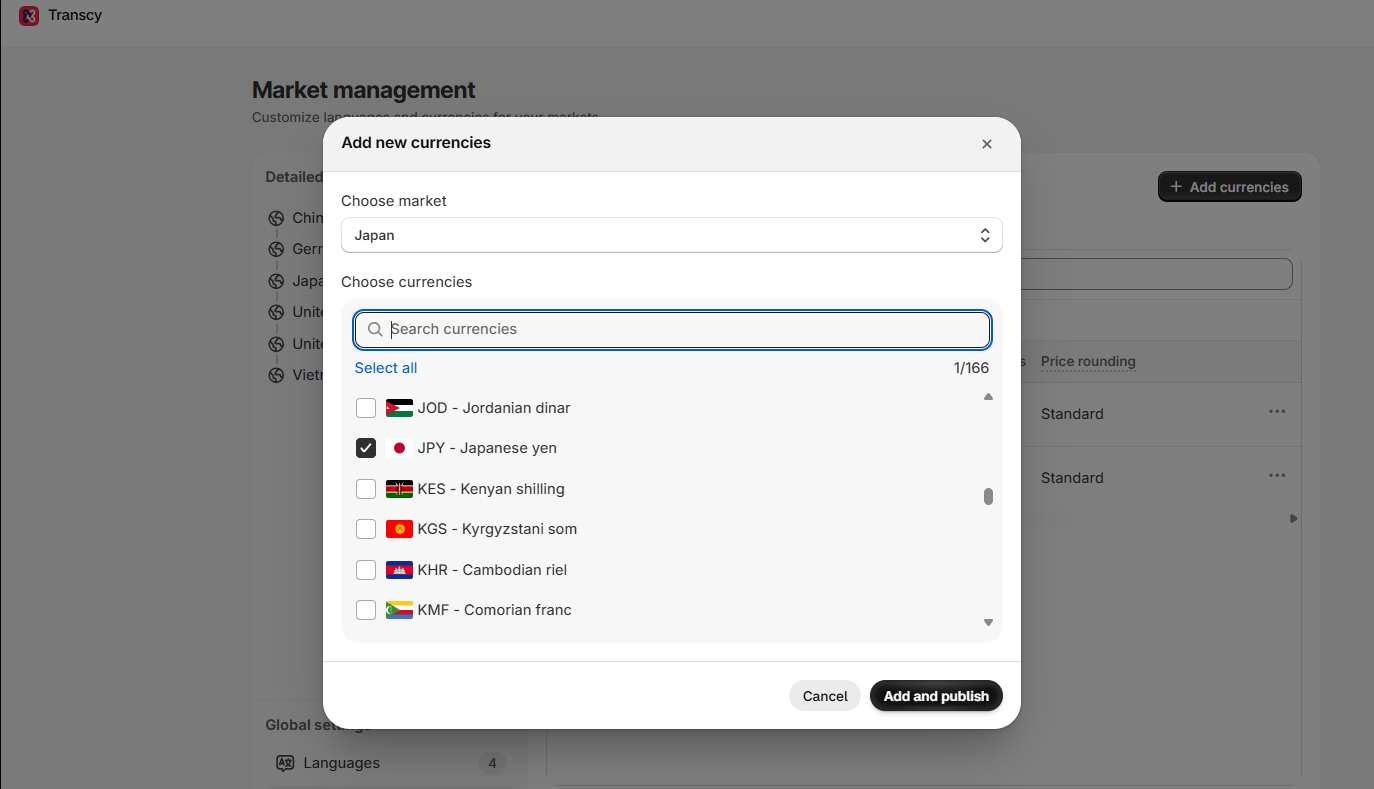
Step 1: Add the currencies you sell in.
Transcy converts the prices shoppers see on your storefront into each market’s currency.
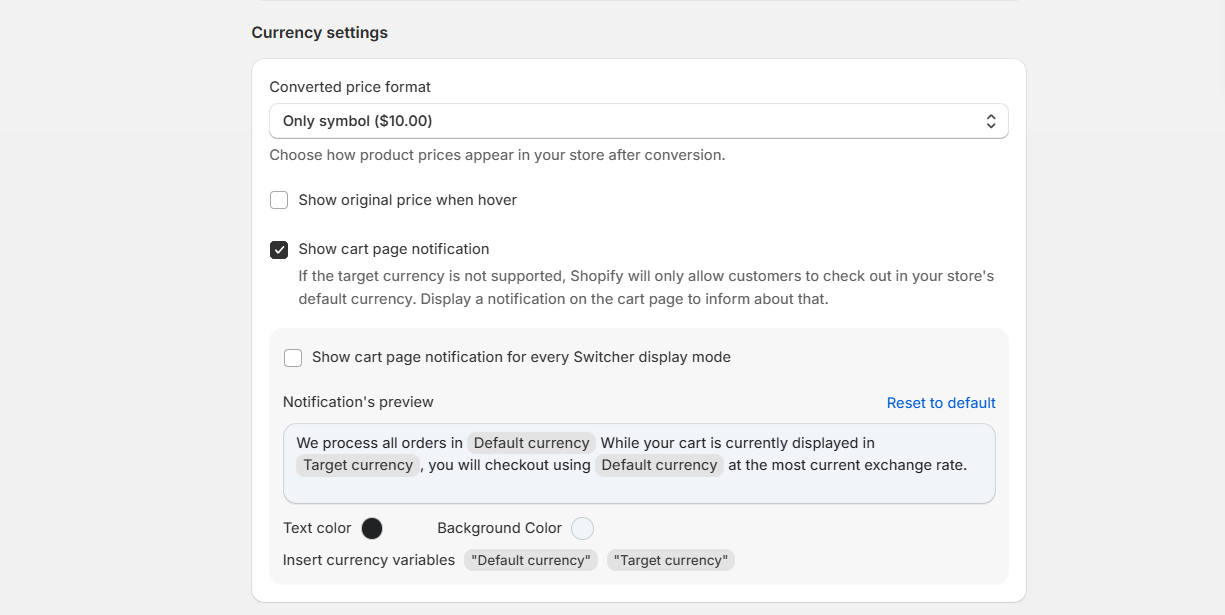
Step 2: Tell shoppers which currency they pay in.
Shoppers can pay in their local currency only when your store uses Shopify Payments and supports that currency; otherwise, checkout reverts to your default currency. Transcy’s cart page notification tells shoppers this before they reach checkout, so the switch does not come as a surprise.
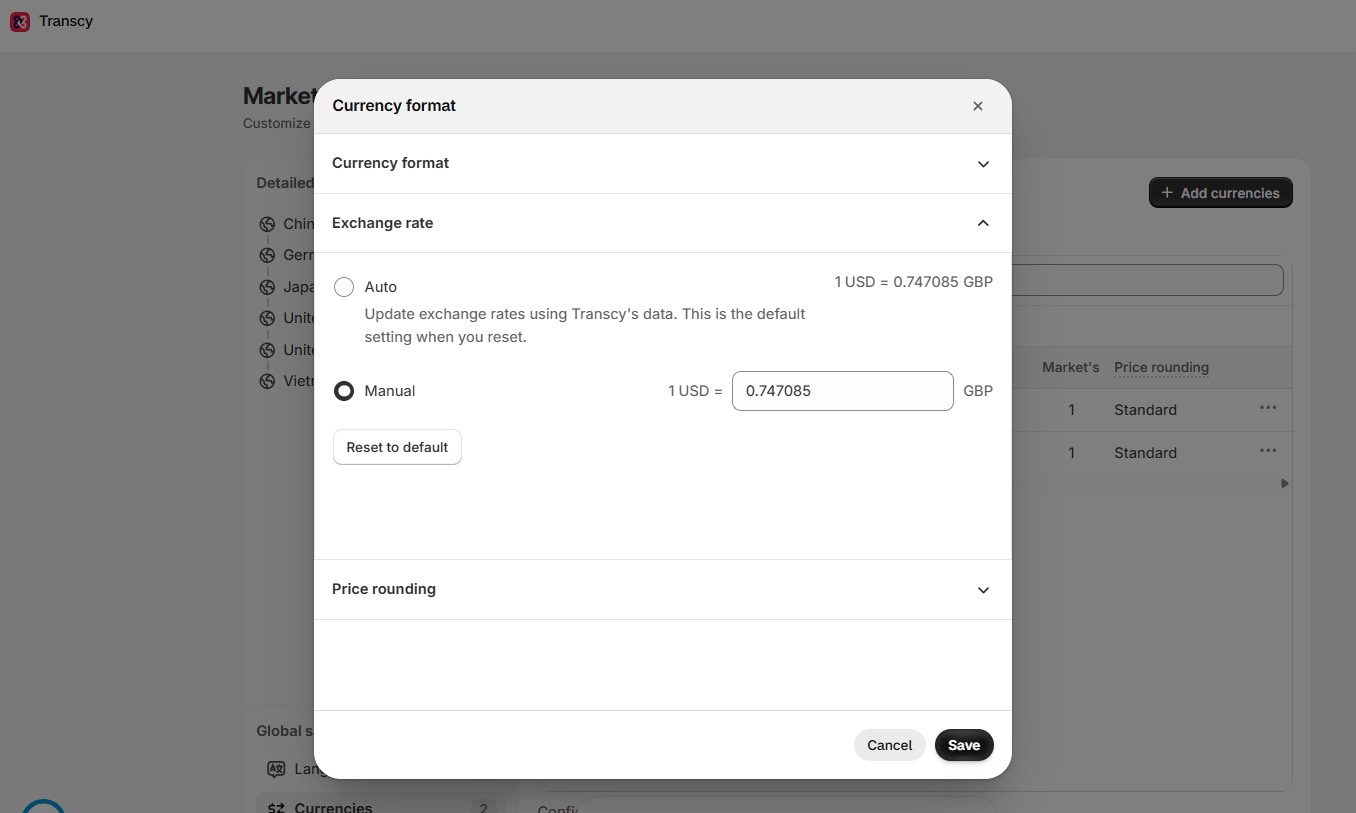
Lock exchange rates before the sale
Transcy refreshes automatic exchange rates once a day, so the prices on your storefront can shift during a sale that runs for a week. A manual rate stays fixed until you change it, so the sale price a shopper saw on Black Friday is still the price on Cyber Monday.
Set a manual rate a few days before Black Friday, then switch back to automatic rates when the campaign ends.
Check price endings after conversion
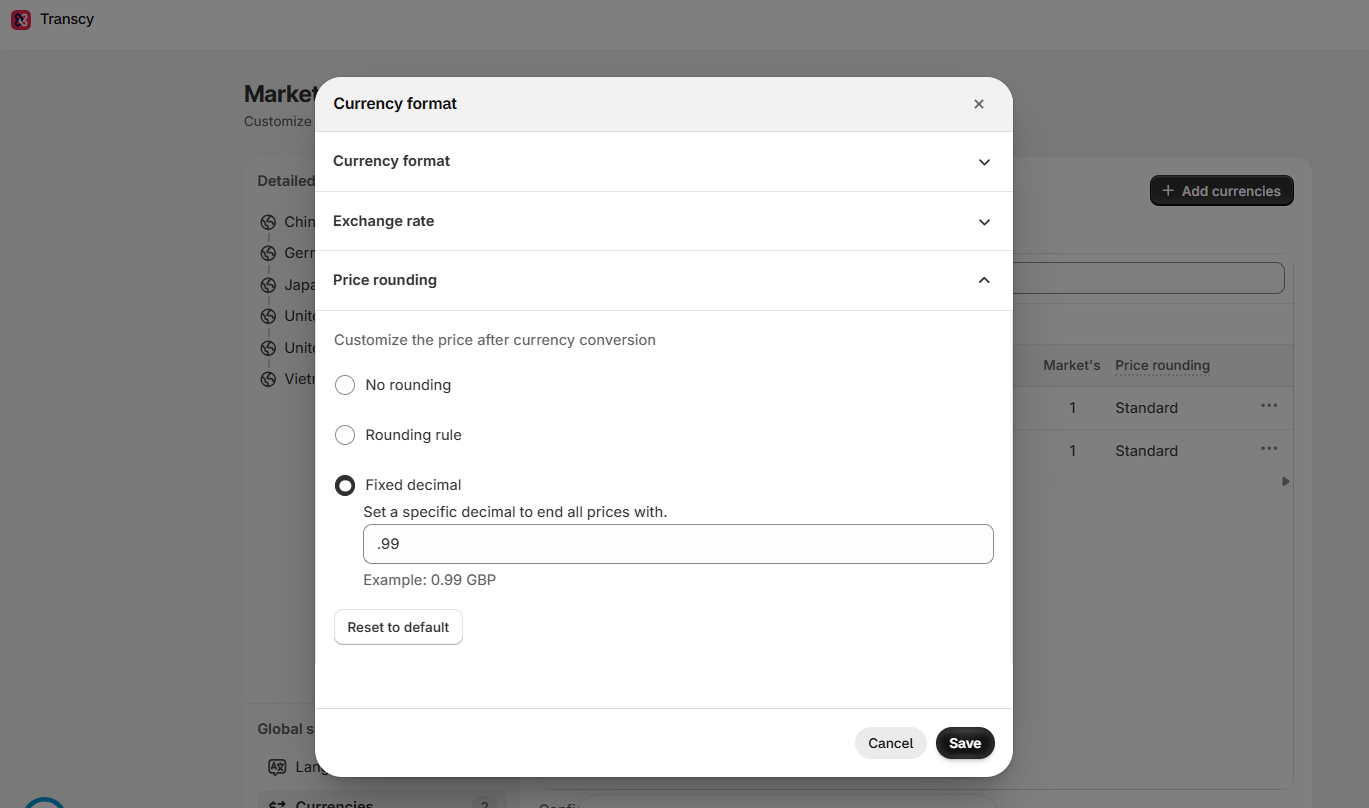
Converted prices rarely land on the endings shoppers are used to, such as .99 or .00.
Transcy’s price rounding can round converted prices up, down, or to the nearest decimal, or give them a fixed ending such as .99, and apply the same rule to other currencies in one step.
Test each market before the sale
Discounts, rounding, fees, and checkout currency each pass their own checks, but shoppers meet them all in a single order. Before the sale, place one test order in each market and confirm that the discount, the rounded price, and the currency charged all match what your ads and product pages promised.
Conclusion
Currency is part of the price international shoppers judge, and a BFCM sale puts that price under the most pressure. Showing local prices opens the door to shoppers who want to pay in their own money, but drifting discounts, rounding, fees, and checkout currency can still turn a clear offer into a surprise. With Black Friday, the sellers who choose one source of conversion, lock their rates, and test each market before launch will keep the price shoppers see and the price they pay the same.

"The best Shopify translation and localization app designed to help merchants expand globally by translating their store content into multiple languages and adapting it to different currencies and markets."


Table of Contents
"The best Shopify translation and localization app designed to help merchants expand globally by translating their store content into multiple languages and adapting it to different currencies and markets."