
Multilingual SEO for Shopify: How to Rank in Every Market
Multilingual SEO for Shopify is often treated as a translation task: translate the pages, then wait for international traffic. Search engines need more than translated text, though. Each language version needs its own address, a clear link to its other versions, and enough time to be crawled before shoppers start searching.
In this guide, we will explain how search engines find each language version, then look at the Shopify settings that decide how those versions rank, and show you how to get your language pages indexed before BFCM.
Search engines need a clear path to each language version.
Before you change any setting, it helps to know what search engines look for. A translated page can only rank when it has its own address, a clear link to its other versions, and a crawl path that does not depend on where the visitor is, so getting these basics right protects everything you build on top.
Most of the web is in English, but most shoppers are not.
English is used by 49.5% of all websites whose content language is known (W3Techs, 2026). By one model-based estimate, English speakers make up about 15% of internet users (OBDILCI, 2025).
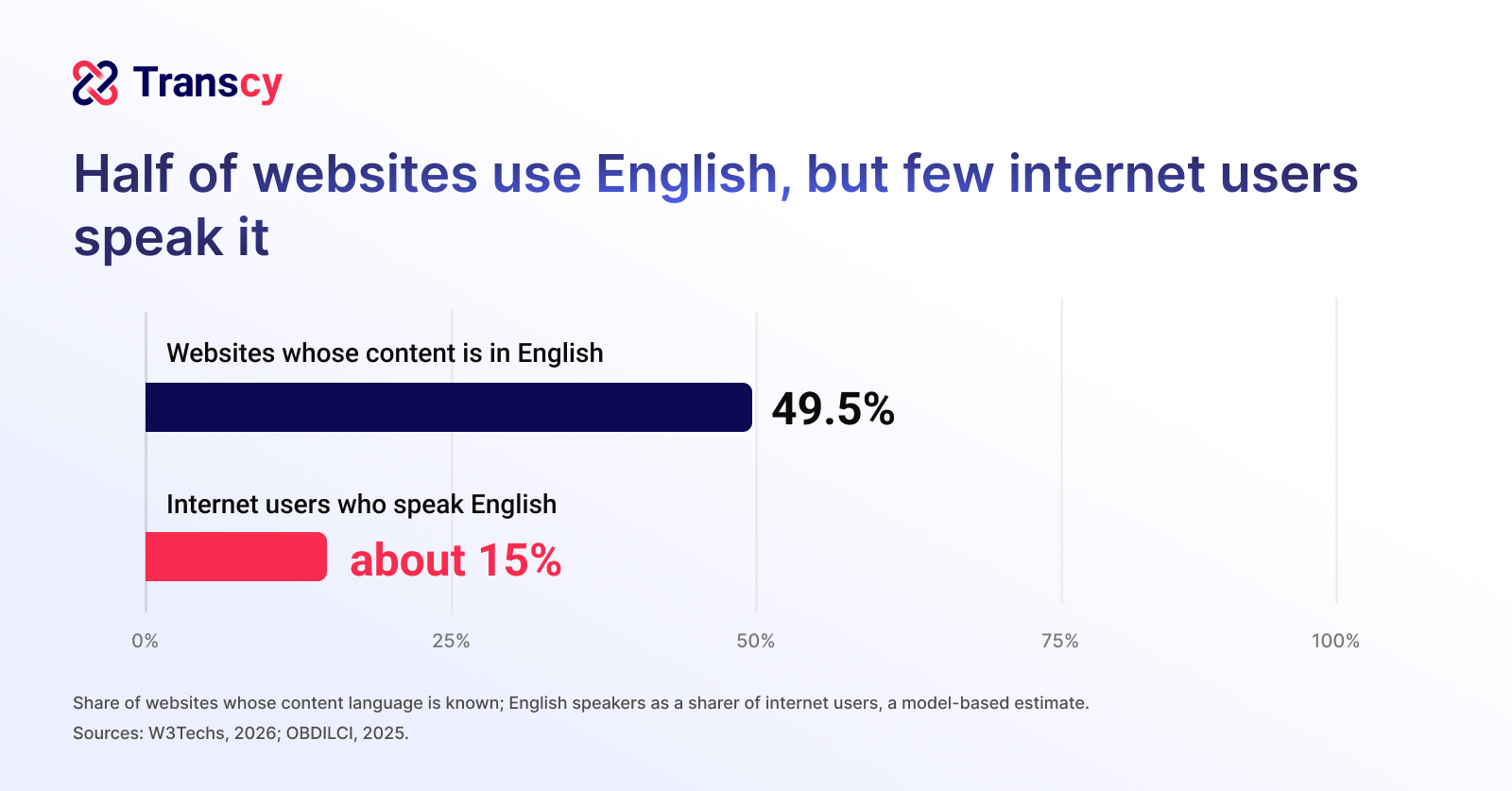
That gap works in your favor. Most other languages have far fewer pages competing for each person searching in them, so a well-translated product page has a better chance to stand out than the same page in English.
A page that exists only in English is a billboard on a road most of your shoppers never drive. Treat each language as its own search channel, and give shoppers in every market a translated page to find.
Each language needs its own URL.
Google recommends using different URLs for each language version of a page rather than using cookies or browser settings to change the language on the same address, and it does not recommend URL parameters for this (Google Search Central, 2025). Google also reads the content of a page to decide its language, not code-level signals such as lang attributes.
If every language shares one address, Google may only ever meet one of them. Its crawler mostly uses US IP addresses and does not send a preferred language, so content that changes by location or browser setting may never be crawled for other markets (Google Search Central, 2025).
Give each language its own front door, rather than one door that changes its sign for every visitor. Each published language in Shopify gets its own URLs through subfolders or domains, which gives search engines a stable page to crawl and rank for every market.
Hreflang tells search engines which version to show.
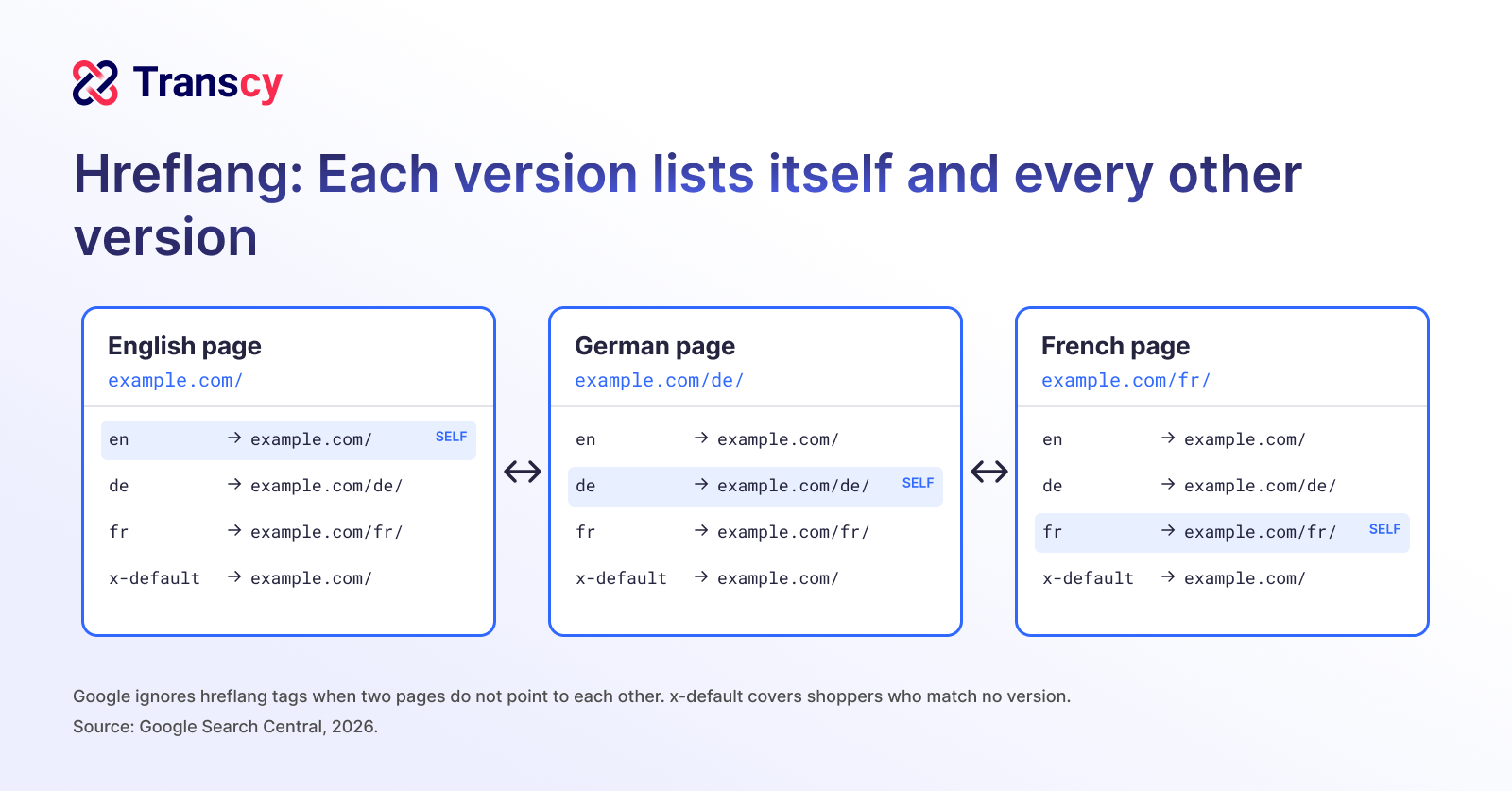
Hreflang tags link the language versions of a page. Google ignores the tags when two pages do not point to each other, and each version must list itself as well as all the other versions (Google Search Central, 2026). Only ISO language and region codes are supported, and an x-default value covers shoppers whose language or region matches none of your versions.
Hreflang mistakes are common, even on established sites. In a study of 374,756 domains, SEO software company Ahrefs found that 67% had at least one hreflang issue, most often a missing x-default tag (Ahrefs, 2023).
Hreflang is a handshake, and Google ignores any hand that is not shaken back. Make sure every version lists itself and its alternates with standard codes, so search engines show a German shopper your German page and a French shopper your French page instead of guessing.
Automatic redirects can hide pages from search.
Google advises against automatically redirecting users from one language version to another and says IP location analysis is “difficult and generally not reliable” (Google Search Central, 2025). In Shopify, automatic redirection is on by default in new stores, search engine crawlers are excluded from it, and content in markets that share a domain is not indexed (Shopify Help, 2026).
Let shoppers choose instead of guessing for them. Keep a visible language and country selector, offer a suggested language rather than forcing a redirect, and give every market you want to rank its own domain, subdomain, or subfolder.
Store settings that decide multilingual rankings
Shopify handles much of the technical work for you, but a few settings decide whether that work pays off. Checking them now can help you avoid problems that are slow to fix once search engines have crawled the wrong version.
URL structure: Subfolders fit most stores
Shopify recommends subfolders for most stores, while top-level country domains give the strongest local signal (Shopify Help, 2026). Google describes country domains as offering clear geotargeting but costing more to run and targeting a single country, and subdirectories as easy to set up and low maintenance (Google Search Central, 2025).
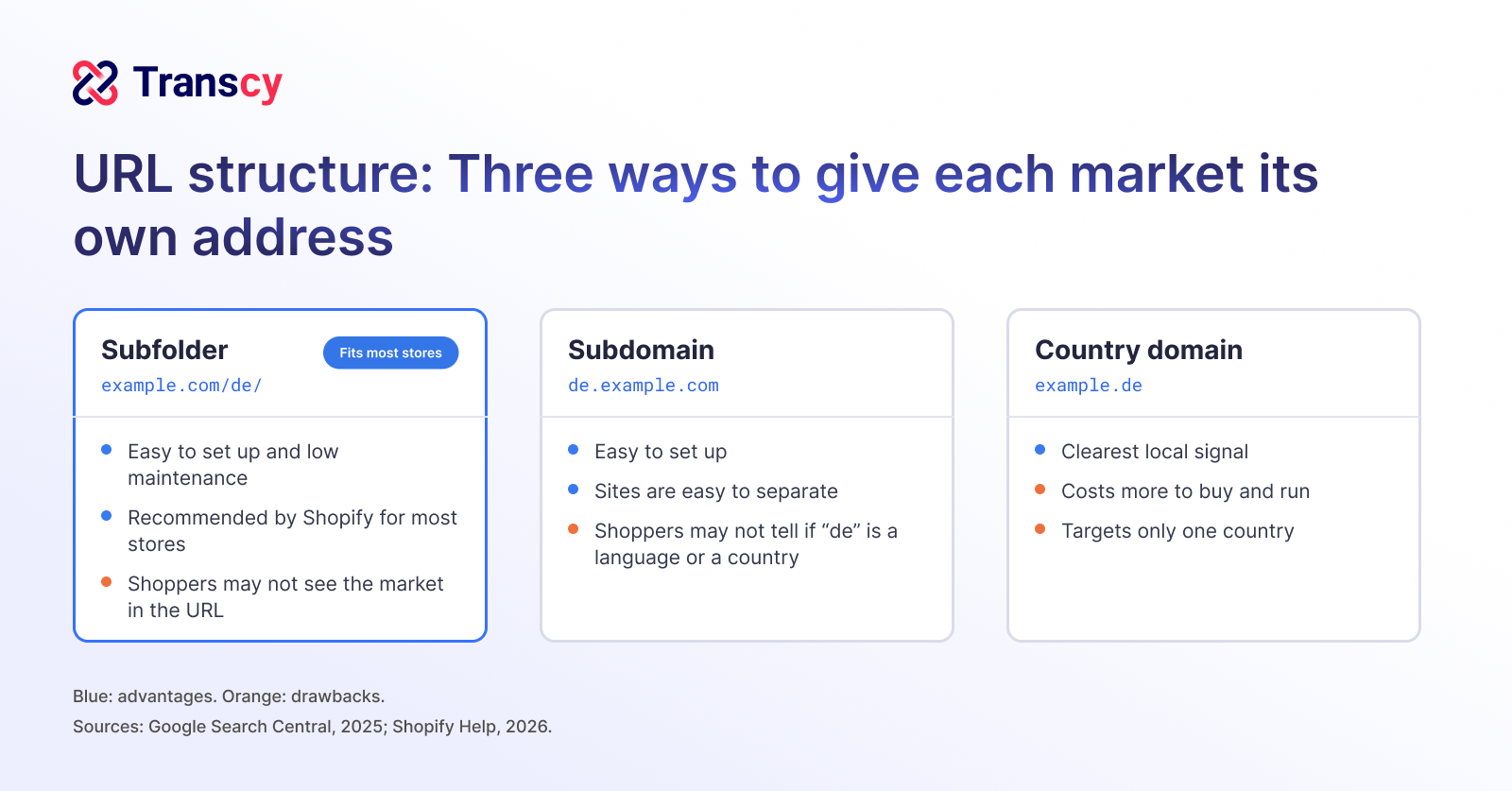
A change of structure is slow to recover from. Google says that when a site moves to new URLs, a small to medium-sized site can take a few weeks for most pages to move in its index, and rankings may fluctuate while it recrawls (Google Search Central, 2026).
Changing your URL structure in November is like moving house the week of your party: the guests still arrive at the old address. Choose subfolders unless a market needs the extra weight of its own country domain, and settle the structure well before BFCM.
Hreflang: Automatic, but easy to duplicate
Shopify adds hreflang tags automatically, but only for markets that have a distinct domain, subdomain, or subfolder, and it adds an x-default tag that points to your primary domain (Shopify Help, 2026). Adding your own tags on top of these “can produce duplicate or conflicting annotations, which can hurt your store’s search ranking” (Shopify, 2026).
Two sets of hreflang tags are two satnavs giving different directions, and search engines may trust neither. If your theme or another app also outputs hreflang, turn one source off, then view the page source of a translated page to confirm each version appears once. If you translate with Transcy, Shopify still generates the hreflang tags, canonical tags, and sitemaps, so there is nothing extra to switch off (Transcy Help, 2026).
Translated URLs and metadata: Translate once, then change with care.
Google treats language versions as duplicates only when the main content of the page stays untranslated (Google Search Central, 2026), so start with the main content, as covered in our guide to language and cart abandonment. In Shopify, automatic translation does not include URL handles; handles are set per language rather than per market, and if you later change a product’s handle, redirects are not supported for its language-specific URLs (Shopify Help, 2026).
Follow the three steps below to translate the SEO content of your key pages.
Step 1: Unblock SEO elements in Transcy
Transcy blocks meta titles, meta descriptions, and URL handles from translation by default, so you decide when your SEO content gets translated. SEO translation works for Editable languages, because SEO content syncs with Shopify Markets.
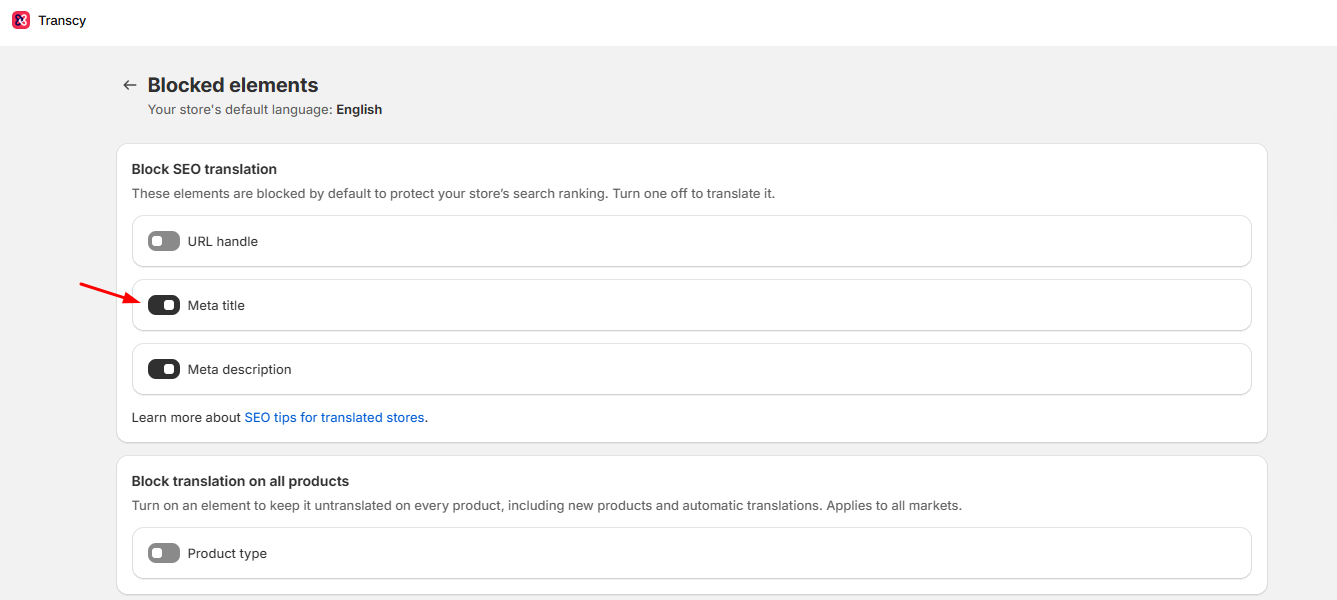
Step 2: Translate titles, descriptions, and handles
Translate the SEO title, meta description, and URL handle of your products, collections, blog posts, and pages, plus your homepage title and description. If a translated handle matches the original, Transcy adds the language code to keep the URLs distinct, so settle handles before BFCM and avoid changing them once they are indexed.
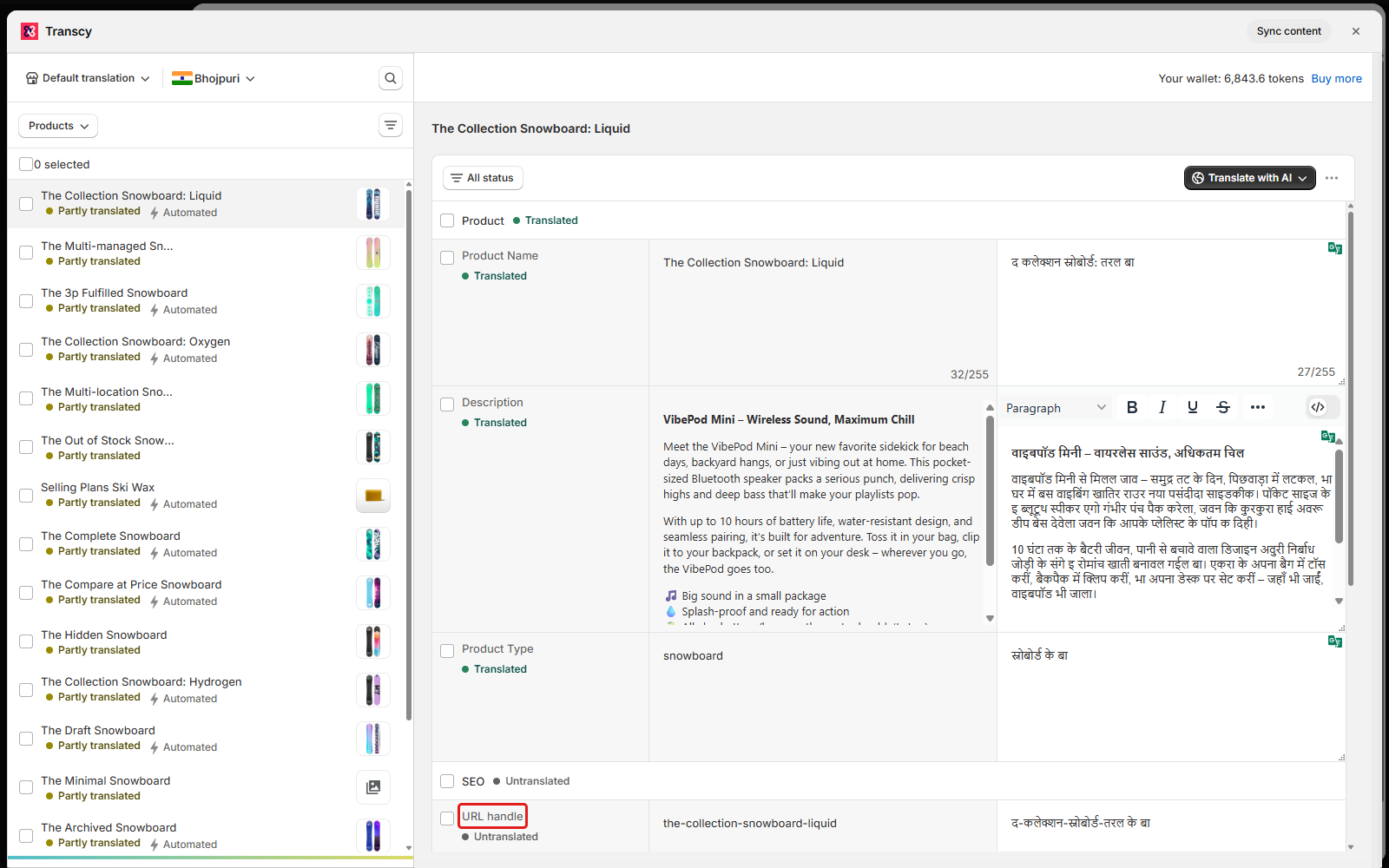
Step 3: Translate image alt text with Shopify.
Transcy does not translate image alt text, so translate it through Shopify’s translation CSV, which has supported alt text since July 2025.
Sitemaps and indexing: Check every language is found.
Shopify generates a sitemap in which each URL includes hreflang annotations, and each version of a page has a self-referencing canonical URL (Shopify Help, 2026). For large numbers of URLs, Google recommends submitting a sitemap rather than requesting each page one by one (Google Search Central, 2025).
Hand search engines the full guest list instead of waiting for them to find every room. Submit the sitemap for each domain in Google Search Console, then inspect a few translated product and collection pages to confirm Google can fetch them.
A multilingual SEO timeline for BFCM 2026
Search engines need time to find new pages, and Black Friday falls on 27 November. A simple timeline can help you publish in the right order, so your translated sale pages are in the index when shoppers start searching.
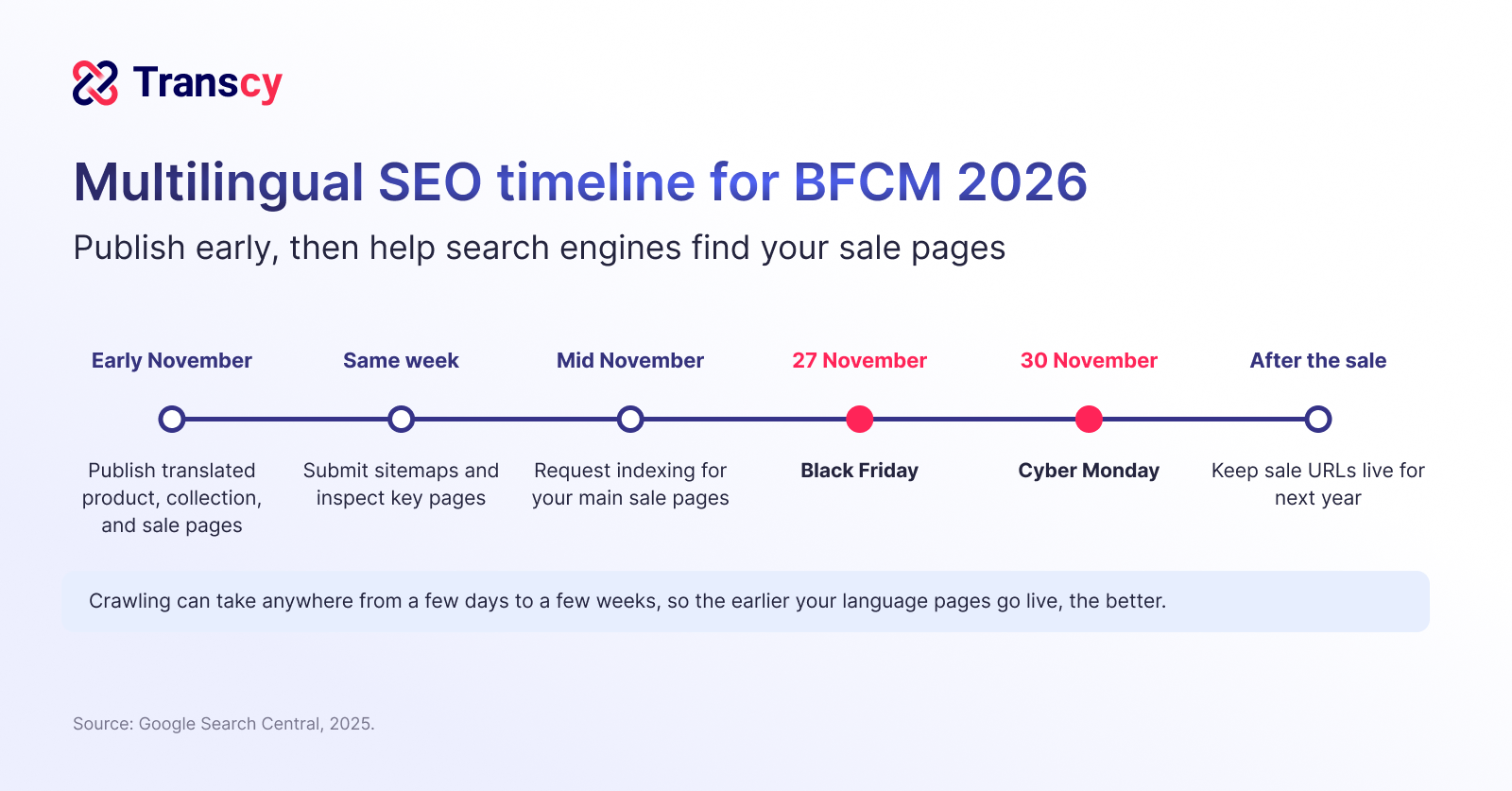
Publish language pages weeks before the sale.
Google says crawling “can take anywhere from a few days to a few weeks” (Google Search Central, 2025). In its guidance for Black Friday pages, it also advises creating the page well before the sale so Googlebot has time to discover and index it (Google Search Central, 2020).
A sale page published on Black Friday is an invitation sent the night of the party. Publish translated product, collection, and sale pages as early as you can in November, and link to them from each language’s homepage so search engines find them sooner.
Use one recurring sale URL in each language.
Google recommends a recurring URL for recurring events, such as /sale/black-friday rather than /sale/2020/black-friday, and suggests reusing the same URL each year with the event name in the page title (Google Search Central, 2021).
Deleting your Black Friday page every December is like closing your shop each winter and reopening at a new address. Create one Black Friday page in each language subfolder, translate its URL handle and title, and keep it live after Cyber Monday so it carries this year’s links and history into next November.
Request indexing for the pages that matter most.
Google sets a quota for individual URL requests, and asking for the same URL again does not get it crawled faster (Google Search Central, 2025).
Spend your requests where the money is. Use URL Inspection in Search Console to request indexing for your main sale page and best-selling collections in each language, and let the sitemap carry the rest.
Conclusion
Translating your store is only half of multilingual SEO, and the other half is making sure search engines can find, understand, and show every language version. We hope the steps in this guide help you get your language pages indexed in time, so shoppers in every market find your BFCM deals in their own language.

"The best Shopify translation and localization app designed to help merchants expand globally by translating their store content into multiple languages and adapting it to different currencies and markets."


Table of Contents
Read more articles

"The best Shopify translation and localization app designed to help merchants expand globally by translating their store content into multiple languages and adapting it to different currencies and markets."